# Hardening SSH Service dengan Menggunakan Port Knocking
## Introduction
### Port Knocking
[**Port Knocking**](https://d3fend.mitre.org/offensive-technique/attack/T1205.001) adalah sebuah teknik yang digunakan untuk memperkuat keamanan sistem dengan cara menyembunyikan port-port pada sistem. Teknik ini biasanya digunakan untuk mengamankan server atau komputer yang terhubung ke internet.
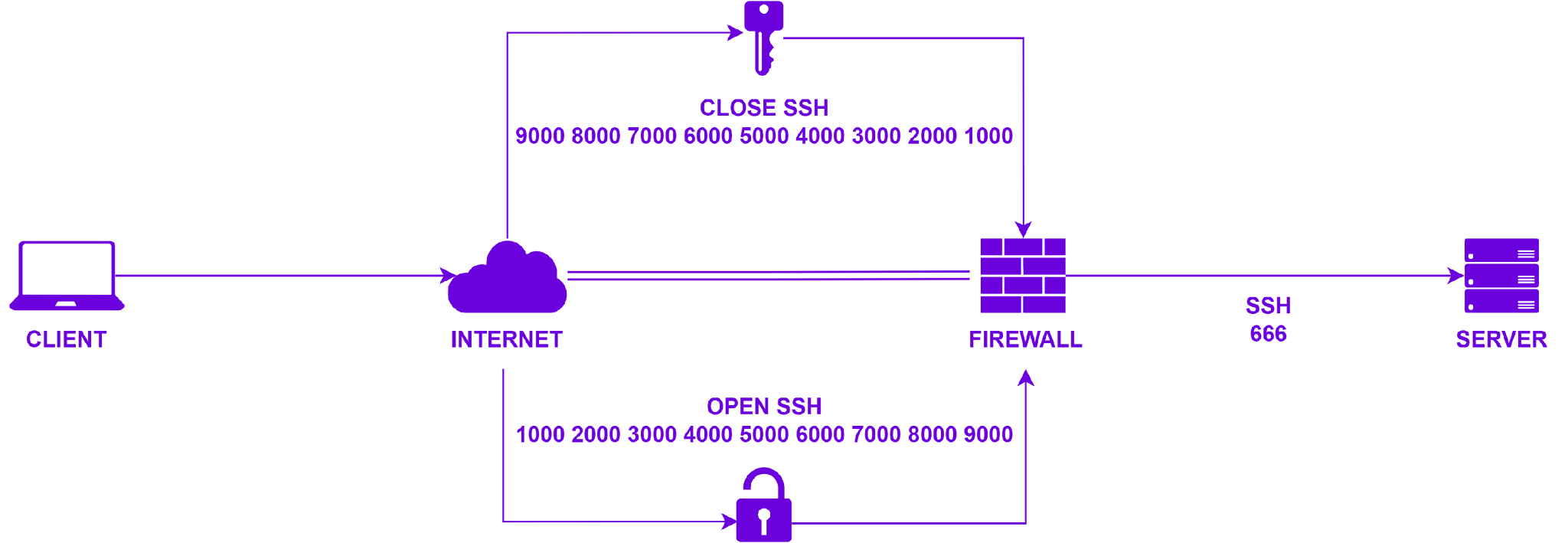
Pada teknik Port Knocking, port-port yang ada di dalam sistem akan ditutup dan hanya akan terbuka jika ada permintaan khusus yang masuk dari luar sistem. Permintaan ini biasanya berupa serangkaian koneksi ke port-port tertentu pada sistem dalam urutan yang telah ditentukan sebelumnya. Setelah urutan ini berhasil dilakukan, sistem akan membuka port-port yang terkunci dan memperbolehkan koneksi masuk.
### Knockd
[**Knockd**](https://linux.die.net/man/1/knockd) adalah sebuah daemon yang digunakan untuk melakukan teknik Port Knocking dan biasanya digunakan pada sistem operasi GNU/Linux dan BSD. Knockd dibuat oleh [**Judd Vinet**](https://zeroflux.org).
Dalam teknik Port Knocking, pintu masuk ke sebuah sistem atau server tidak terbuka secara permanen, melainkan hanya dibuka ketika permintaan khusus telah diterima. Teknik ini bertujuan untuk meningkatkan keamanan sistem, karena hanya pengguna yang memiliki kode rahasia (biasanya dalam bentuk serangkaian permintaan koneksi ke port tertentu) yang dapat membuka pintu masuk ke sistem, Knockd sendiri beroperasi pada Layer 4 atau Transport Layer dalam model [**OSI (Open Systems Interconnection)**](https://www.iso.org/ics/35.100/x).
Knockd dapat diintegrasikan dengan sistem firewall seperti [**IPtables**](https://linux.die.net/man/8/iptables) untuk meningkatkan keamanan sistem.
## Workflow
Port Knocking
## Installation
### System Update
Sebelum melakukan hardening service SSH menggunakan teknik pengamanan Port Knocking terlebih dahulu kita perlu meng-install paket software Knockd, yang mana pada simulasi ini daemon Knockd di-install di Ubuntu 22.04.3 LTS, sebelum masuk ke proses instalasi terlebih dahulu kita harus melakukan pembaruan pada sistem, berikut perintah yang digunakan:
{% code overflow="wrap" lineNumbers="true" %}
```bash
sudo apt-get update
sudo apt-get upgrade
```
{% endcode %}
### Install Paket Software Knockd
Sebelum daemon Knockd dapat digunakan di Ubuntu 22.04.3 LTS, terlebih dahulu kita harus meng-install paket software-nya, berikut perintah yang digunakan:
{% code overflow="wrap" lineNumbers="true" %}
```bash
sudo apt-get install knockd
```
{% endcode %}
### Konfigurasi SSH
Setelah daemon Knockd berhasil ter-install, terlebih dahulu lakukan konfigurasi SSH pada bagian **`Port`**, ubah default port (**`22`**) dengan custom port (Misal: **`666`**) dan setelah itu pada bagian **`PasswordAuthentication`** ubah value-nya menjadi **`yes`**:
{% code overflow="wrap" lineNumbers="true" %}
```bash
sudo vi /etc/ssh/sshd_config
```
{% endcode %}
### Melihat Interface Network
Sebelum melakukan konfigurasi pada daemon Knockd, lakukan pengecekan pada interface network yang nantinya akan kita gunakan pada saat implementasi teknik Port Knocking:
{% code overflow="wrap" lineNumbers="true" %}
```bash
ip addr
```
{% endcode %}
{% hint style="success" %}
{% code title="Output" %}
```bash
1: lo: mtu 65536 qdisc noqueue state UNKNOWN group default qlen 1000
link/loopback 00:00:00:00:00:00 brd 00:00:00:00:00:00
inet 127.0.0.1/8 scope host lo
valid_lft forever preferred_lft forever
inet6 ::1/128 scope host
valid_lft forever preferred_lft forever
2: ens3: mtu 1500 qdisc fq_codel state UP group default qlen 1000
link/ether 4b:cd:f6:h1:jk:lm brd ff:ff:ff:ff:ff:ff
altname enp0s3
inet 192.168.6.66/24 metric 100 brd 192.168.6.255 scope global dynamic ens3
valid_lft 29506sec preferred_lft 29506sec
inet6 4bcd::f6h1:jklm:0pqr:57uv/64 scope link
valid_lft forever preferred_lft forever
```
{% endcode %}
{% endhint %}
### Konfigurasi Knockd
Selanjutnya lakukan konfigurasi pada daemon Knockd, kemudian sesuaikan pada bagian **`START_KNOCKD`** dan **`KNOCKD_OPTS`**:
{% code overflow="wrap" lineNumbers="true" %}
```bash
sudo vi /etc/default/knockd
```
{% endcode %}
{% hint style="warning" %}
{% code title="/etc/default/knockd" %}
```markdown
# control if we start knockd at init or not
# 1 = start
# anything else = don't start
# PLEASE EDIT /etc/knockd.conf BEFORE ENABLING
START_KNOCKD=1
# command line options
KNOCKD_OPTS="-i ens3"
```
{% endcode %}
{% endhint %}
{% hint style="info" %}
```markdown
1 = Service Knockd akan dijalankan secara otomatis pada saat OS booting
-i ens3 = Interface network yang diguanakan di dalam OS yakni ens3
```
{% endhint %}
Selanjutnya lakukan konfigurasi pada file konfigurasi utama dari daemon Knockd:
{% code overflow="wrap" lineNumbers="true" %}
```bash
sudo vi /etc/knockd.conf
```
{% endcode %}
{% hint style="warning" %}
{% code title="/etc/knockd.conf" %}
```markdown
[options]
UseSyslog
[openSSH]
sequence = 1000,2000,3000,4000,5000,6000,7000,8000,9000
seq_timeout = 10
command = /sbin/iptables -I INPUT -s %IP% -p tcp --dport 666 -j ACCEPT
tcpflags = syn
[closeSSH]
sequence = 9000,8000,7000,6000,5000,4000,3000,2000,1000
seq_timeout = 10
command = /sbin/iptables -D INPUT -s %IP% -p tcp --dport 666 -j ACCEPT
tcpflags = syn
```
{% endcode %}
{% endhint %}
{% hint style="info" %}
```markdown
UseSyslog = Semua log dari daemon Knockd disimpan pada /var/log/syslog
sequence = Urutan ketukan dari Port Knocking
seq_timeout = Waktu yang dibutuhkan pada saat ketukan dilakukan
10 = 10 detik
command = Perintah yang dijalankan pada saat Port Knocking berhasil dilakukan
tcpflags = Untuk mengidentifikasi paket yang masuk berdasarkan jenis flag TCP
syn = Flag SYN (Synchronize) dalam header TCP
```
{% endhint %}
### Restart Service
Setelah konfigurasi dari SSH dan Knockd selesai dilakukan, restart service untuk melihat perubahan yang terjadi:
{% code overflow="wrap" lineNumbers="true" %}
```bash
sudo systemctl restart sshd
sudo systemctl restart knockd
sudo systemctl enable knockd
sudo systemctl status knockd -l
```
{% endcode %}
{% hint style="success" %}
{% code title="Output" %}
```bash
● knockd.service - Port-Knock Daemon
Loaded: loaded (/lib/systemd/system/knockd.service; enabled; vendor preset: enabled)
Active: active (running) since Tue 2023-08-08 00:32:30 UTC; 1 week 0 days ago
Docs: man:knockd(1)
Main PID: 648 (knockd)
Tasks: 1 (limit: 4645)
Memory: 964.0K
CPU: 288ms
CGroup: /system.slice/knockd.service
└─648 /usr/sbin/knockd -i ens3
```
{% endcode %}
{% endhint %}
### Penambahan Rule Firewall
Selanjutnya lakukan penambahan rule firewall yang dibutuhkan untuk Knockd:
{% code overflow="wrap" lineNumbers="true" %}
```bash
sudo iptables -A INPUT -m conntrack --ctstate ESTABLISHED,RELATED -j ACCEPT
sudo iptables -A INPUT -p tcp --dport 666 -j REJECT
sudo iptables -L --line-numbers
```
{% endcode %}
{% hint style="success" %}
{% code title="Output" %}
```bash
Chain INPUT (policy ACCEPT)
num target prot opt source destination
1 ACCEPT tcp -- 234.56.78.90 anywhere tcp dpt:666
2 ACCEPT all -- anywhere anywhere ctstate RELATED,ESTABLISHED
3 REJECT tcp -- anywhere anywhere tcp dpt:666 reject-with icmp-port-unreachable
```
{% endcode %}
{% endhint %}
{% hint style="info" %}
```markdown
-A INPUT = Menambahkan rule firewall baru ke chain INPUT
-m conntrack = Modul firewall yang digunakan yakni conntrack, modul ini digunakan untuk mengizinkan paket yang berhubungan dengan koneksi
--ctstate ESTABLISHED,RELATED = Aturan firewall yang digunakan untuk memeriksa paket-paket yang memiliki status koneksi ESTABLISHED atau RELATED
-j ACCEPT = Memberikan izin bagi paket-paket yang memenuhi kriteria dalam aturan firewall sebelum mencapai tujuan akhir
-p tcp = Protocol yang digunakan yakni TCP
--dport 666 = Port tujuan yang digunakan yakni 666
-j REJECT = Menolak paket-paket yang mencoba berkomunikasi melalui port tujuan
-L --line-numbers = Menampilkan output aturan firewall dengan disertai nomor baris
```
{% endhint %}
## Testing
### Install Paket Software Knock
Setelah semua konfigurasi selesai dilakukan, langkah terakhir yakni melakukan pengetesan terhadap teknik Port Knocking yang sudah diimplementasikan pada service SSH, pastikan terlebih dahulu komputer atau VM yang kita miliki sudah ter-install [**Knock**](https://linux.die.net/man/1/knock) client:
{% code title="Debian, Ubuntu" overflow="wrap" lineNumbers="true" %}
```bash
sudo apt-get install knockd
```
{% endcode %}
{% code title="CentOS, RHEL" overflow="wrap" lineNumbers="true" %}
```bash
sudo yum install epel-release
sudo yum install knock
```
{% endcode %}
{% code title="Fedora" overflow="wrap" lineNumbers="true" %}
```bash
sudo dnf install knock
```
{% endcode %}
{% code title="Arch Linux" overflow="wrap" lineNumbers="true" %}
```bash
sudo pamac install knockd
```
{% endcode %}
{% code title="Manjaro Linux" overflow="wrap" lineNumbers="true" %}
```bash
sudo pacman -Sy knockd
```
{% endcode %}
### Port Knocking (openSSH)
Untuk memverifikasi akses SSH ke VM tujuan yang sebelumnya sudah diimplementasikan Port Knocking dapat menggunakan Telnet atau langsung dapat melakukan SSH:
{% code title="Telnet" overflow="wrap" lineNumbers="true" %}
```bash
telnet 123.45.67.89 666
```
{% endcode %}
{% hint style="danger" %}
{% code title="Output" %}
```bash
Trying 123.45.67.89...
telnet: Unable to connect to remote host: Connection refused
```
{% endcode %}
{% endhint %}
{% code title="SSH" overflow="wrap" lineNumbers="true" %}
```bash
ssh user@123.45.67.89 -p666
```
{% endcode %}
{% hint style="danger" %}
{% code title="Output" %}
```bash
ssh: connect to host 123.45.67.89 port 666: Connection refused
```
{% endcode %}
{% endhint %}
Kondisi diatas menunjukan bahwa saat ini koneksi ke VM tujuan dengan port **666** ditolak oleh firewall dan perlu dilakukan verifikasi Port Knocking terlebih dahulu untuk dapat masuk ke VM tujuan:
{% code title="Knock" overflow="wrap" lineNumbers="true" %}
```bash
knock -v 123.45.67.89 1000 2000 3000 4000 5000 6000 7000 8000 9000 -d 500
```
{% endcode %}
{% hint style="success" %}
{% code title="Output" %}
```bash
hitting tcp 123.45.67.89:1000
hitting tcp 123.45.67.89:2000
hitting tcp 123.45.67.89:3000
hitting tcp 123.45.67.89:4000
hitting tcp 123.45.67.89:5000
hitting tcp 123.45.67.89:6000
hitting tcp 123.45.67.89:7000
hitting tcp 123.45.67.89:8000
hitting tcp 123.45.67.89:9000
```
{% endcode %}
{% endhint %}
{% hint style="info" %}
```markdown
123.45.67.89 = IP Public dari VM tujuan
1000 2000 3000 4000 5000 6000 7000 8000 9000 = Urutan port-port (sequence) untuk membuka SSH (openSSH)
-v = Menampilkan pesan status verbose
-d = Waktu menunggu pada saat urutan port-port (sequence) dilakukan hit
500 = 500 detik
```
{% endhint %}
Berikut ini kondisi setelah dilakukan verifikasi Port Knocking untuk **`openSSH`**:
{% code title="Telnet" overflow="wrap" lineNumbers="true" %}
```bash
telnet 123.45.67.89 666
```
{% endcode %}
{% hint style="success" %}
{% code title="Output" %}
```bash
Trying 123.45.67.89...
Connected to 123.45.67.89.
Escape character is '^]'.
SSH-2.0-OpenSSH_8.9p1 Ubuntu-3ubuntu0.3
```
{% endcode %}
{% endhint %}
{% code title="SSH" overflow="wrap" lineNumbers="true" %}
```bash
ssh user@123.45.67.89 -p666
```
{% endcode %}
{% hint style="warning" %}
{% code title="Output" %}
```bash
へようこそ
███████╗ █████╗ ███╗ ██╗██████╗ ██████╗ ██████╗ ██╗ ██╗
██╔════╝██╔══██╗████╗ ██║██╔══██╗██╔══██╗██╔═══██╗╚██╗██╔╝
███████╗███████║██╔██╗ ██║██║ ██║██████╔╝██║ ██║ ╚███╔╝
╚════██║██╔══██║██║╚██╗██║██║ ██║██╔══██╗██║ ██║ ██╔██╗
███████║██║ ██║██║ ╚████║██████╔╝██████╔╝╚██████╔╝██╔╝ ██╗
╚══════╝╚═╝ ╚═╝╚═╝ ╚═══╝╚═════╝ ╚═════╝ ╚═════╝ ╚═╝ ╚═╝
(user@123.45.67.89) Password:
```
{% endcode %}
{% endhint %}
### Port Knocking (closeSSH)
Apabila kita ingin menutup kembali akses SSH diperlukan juga verifikasi Port Knocking untuk **`closeSSH`**:
{% code title="Knock" overflow="wrap" lineNumbers="true" %}
```bash
knock -v 123.45.67.89 9000 8000 7000 6000 5000 4000 3000 2000 1000 -d 500
```
{% endcode %}
{% hint style="danger" %}
{% code title="Output" %}
```bash
hitting tcp 123.45.67.89:9000
hitting tcp 123.45.67.89:8000
hitting tcp 123.45.67.89:7000
hitting tcp 123.45.67.89:6000
hitting tcp 123.45.67.89:5000
hitting tcp 123.45.67.89:4000
hitting tcp 123.45.67.89:3000
hitting tcp 123.45.67.89:2000
hitting tcp 123.45.67.89:1000
```
{% endcode %}
{% endhint %}
{% hint style="info" %}
```markdown
123.45.67.89 = IP Public dari VM tujuan
9000 8000 7000 6000 5000 4000 3000 2000 1000 = Urutan port-port (sequence) untuk menutup SSH (closeSSH)
-v = Menampilkan pesan status verbose
-d = Waktu menunggu pada saat urutan port-port (sequence) dilakukan hit
500 = 500 detik
```
{% endhint %}
Berikut ini kondisi setelah dilakukan verifikasi Port Knocking untuk **`closeSSH`**:
{% code title="Telnet" overflow="wrap" lineNumbers="true" %}
```bash
telnet 123.45.67.89 666
```
{% endcode %}
{% hint style="danger" %}
{% code title="Output" %}
```bash
Trying 123.45.67.89...
telnet: Unable to connect to remote host: Connection refused
```
{% endcode %}
{% endhint %}
{% code title="SSH" overflow="wrap" lineNumbers="true" %}
```bash
ssh user@123.45.67.89 -p666
```
{% endcode %}
{% hint style="danger" %}
{% code title="Output" %}
```bash
ssh: connect to host 123.45.67.89 port 666: Connection refused
```
{% endcode %}
{% endhint %}
### Melihat Log dari Knockd
Berikut ini adalah log dari daemon Knockd pada saat dilakukan verifikasi Port Knocking dari sisi client, baik itu pada saat kondisi **`openSSH`** maupun **`closeSSH`**:
{% code overflow="wrap" lineNumbers="true" %}
```bash
sudo tail -f /var/log/syslog
```
{% endcode %}
{% hint style="warning" %}
{% code title="Output" %}
```markdown
Aug 15 18:36:16 sandbox knockd: openSSH: running command: /sbin/iptables -I INPUT -s 123.45.67.89 -p tcp --dport 666 -j ACCEPT
Aug 15 18:36:51 sandbox systemd[1]: Started Session 216 of User user.
Aug 15 18:37:34 sandbox systemd[1]: Stopping OpenBSD Secure Shell server...
Aug 15 18:37:34 sandbox systemd[1]: ssh.service: Deactivated successfully.
Aug 15 18:37:34 sandbox systemd[1]: Stopped OpenBSD Secure Shell server.
Aug 15 18:37:34 sandbox systemd[1]: ssh.service: Consumed 1.726s CPU time.
Aug 15 18:37:34 sandbox systemd[1]: Starting OpenBSD Secure Shell server...
Aug 15 18:37:34 sandbox systemd[1]: Started OpenBSD Secure Shell server.
Aug 15 18:37:39 sandbox systemd[1]: session-216.scope: Deactivated successfully.
Aug 15 18:38:38 sandbox systemd[1]: Started Session 217 of User user.
Aug 15 18:39:40 sandbox knockd: 123.45.67.89: closeSSH: Stage 1
Aug 15 18:39:41 sandbox knockd: 123.45.67.89: closeSSH: Stage 2
Aug 15 18:39:41 sandbox knockd: 123.45.67.89: closeSSH: Stage 3
Aug 15 18:39:42 sandbox knockd: 123.45.67.89: closeSSH: Stage 4
Aug 15 18:39:42 sandbox knockd: 123.45.67.89: closeSSH: Stage 5
Aug 15 18:39:43 sandbox knockd: 123.45.67.89: closeSSH: Stage 6
Aug 15 18:39:43 sandbox knockd: 123.45.67.89: closeSSH: Stage 7
Aug 15 18:39:44 sandbox knockd: 123.45.67.89: closeSSH: Stage 8
Aug 15 18:39:44 sandbox knockd: 123.45.67.89: closeSSH: Stage 9
Aug 15 18:39:44 sandbox knockd: 123.45.67.89: closeSSH: OPEN SESAME
Aug 15 18:39:44 sandbox knockd: closeSSH: running command: /sbin/iptables -D INPUT -s 123.45.67.89 -p tcp --dport 666 -j ACCEPT
Aug 15 18:40:11 sandbox knockd: 123.45.67.89: openSSH: Stage 1
Aug 15 18:40:11 sandbox knockd: 123.45.67.89: openSSH: Stage 2
Aug 15 18:40:12 sandbox knockd: 123.45.67.89: openSSH: Stage 3
Aug 15 18:40:12 sandbox knockd: 123.45.67.89: openSSH: Stage 4
Aug 15 18:40:13 sandbox knockd: 123.45.67.89: openSSH: Stage 5
Aug 15 18:40:13 sandbox knockd: 123.45.67.89: openSSH: Stage 6
Aug 15 18:40:14 sandbox knockd: 123.45.67.89: openSSH: Stage 7
Aug 15 18:40:14 sandbox knockd: 123.45.67.89: openSSH: Stage 8
Aug 15 18:40:15 sandbox knockd: 123.45.67.89: openSSH: Stage 9
Aug 15 18:40:15 sandbox knockd: 123.45.67.89: openSSH: OPEN SESAME
Aug 15 18:40:15 sandbox knockd: openSSH: running command: /sbin/iptables -I INPUT -s 123.45.67.89 -p tcp --dport 666 -j ACCEPT
Aug 15 18:40:46 sandbox systemd[1]: session-208.scope: Deactivated successfully.les -D INPUT -s 123.45.67.89 -p tcp --dport 666 -j ACCEPT
```
{% endcode %}
{% endhint %}
Demikian sedikit pengetahuan dan pengalaman yang dapat saya bagikan, semoga apa yang telah saya sampaikan dapat bermanfaat bagi kita semua.
Publikasi
* [**Hide An SSH Server Using Port Knocking**](https://docs.google.com/presentation/d/1pBdOfiJrOgR4NUUH-bwBIvVg5zVqgHOv)
---
# Agent Instructions: Querying This Documentation
If you need additional information that is not directly available in this page, you can query the documentation dynamically by asking a question.
Perform an HTTP GET request on the current page URL with the `ask` query parameter:
```
GET https://blog.madfxr.my.id/documentation/categories/cyber-security/hardening-ssh-service-dengan-menggunakan-port-knocking.md?ask=
```
The question should be specific, self-contained, and written in natural language.
The response will contain a direct answer to the question and relevant excerpts and sources from the documentation.
Use this mechanism when the answer is not explicitly present in the current page, you need clarification or additional context, or you want to retrieve related documentation sections.